Wallets — Hot vs Cold
A Bitcoin wallet doesn't hold coins. It holds keys — specifically a private key that proves you own UTXOs assigned to your addresses. Choosing the right wallet is choosing where those keys live and how exposed they are.
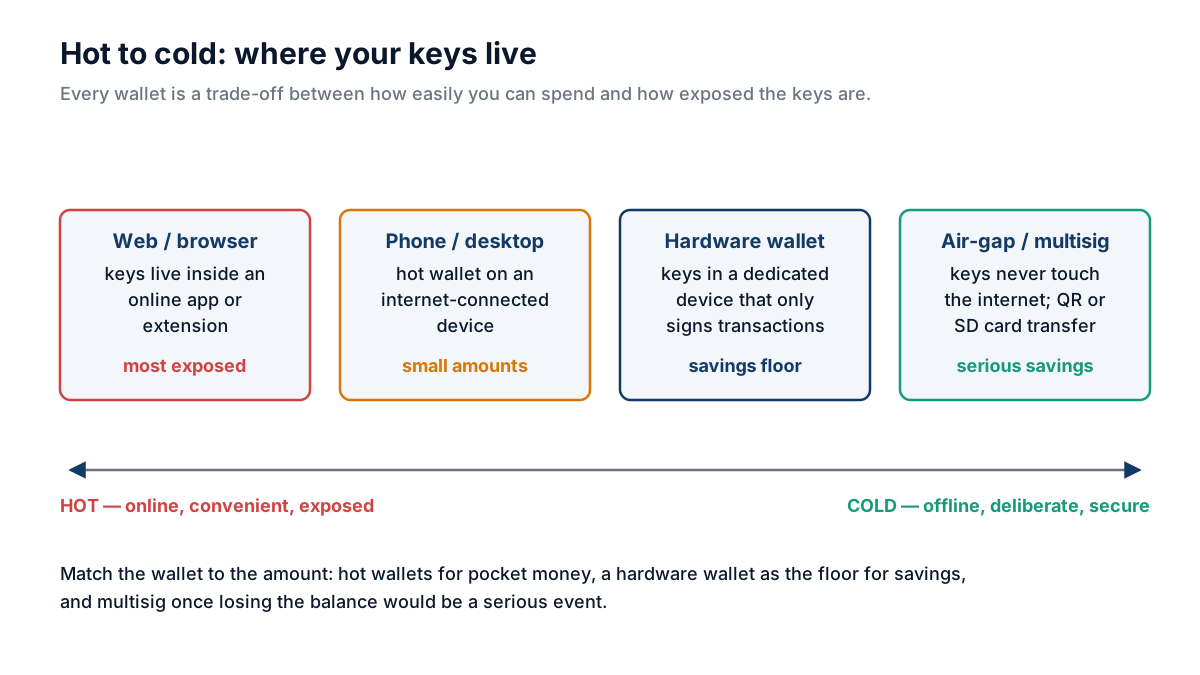
Hot and cold describe where keys live: the further the keys sit from the internet, the safer the funds and the more deliberate each spend.
Academy original
Hot wallets
Definition: Keys stored on an internet-connected device (phone, laptop, browser extension).
Examples: Phoenix, Muun, BlueWallet, Sparrow (with online node), Electrum.
Good for:
- Small amounts you spend regularly
- Quick everyday transactions
- Lightning Network usage
Bad for:
- Significant savings (one malware infection = total loss)
- Long-term storage
Cold wallets
Definition: Keys generated and stored offline, never touching an internet-connected device.
Hardware wallets (Trezor, Coldcard, Ledger): a dedicated device that signs transactions internally and only ever exports signed transactions, never private keys.
Air-gapped setups (Coldcard + SD card, Seedsigner): never connect via USB at all. Transactions flow via QR codes or SD cards.
Paper wallets (mostly deprecated): keys printed on paper. Hard to use safely; one bad print or one re-import handling = loss.
Multisig
M-of-N multisig: transactions require M signatures from a set of N keys. Common setups:
- 2-of-3: two of three keys needed. Lose one key → still recoverable. One key compromised → still safe.
- 3-of-5: for larger amounts. Distributed across geographies + custodians.
Multisig is the gold standard for serious self-custody. Setup is more complex but eliminates single-point-of-failure.
What every wallet has
Seed phrase (12 or 24 words): the entire wallet derives from this. Backup it physically (metal stamp or paper, kept offline). Anyone with the seed phrase controls the funds.
Addresses: generated deterministically from the seed. A modern wallet generates a fresh address for every receive.
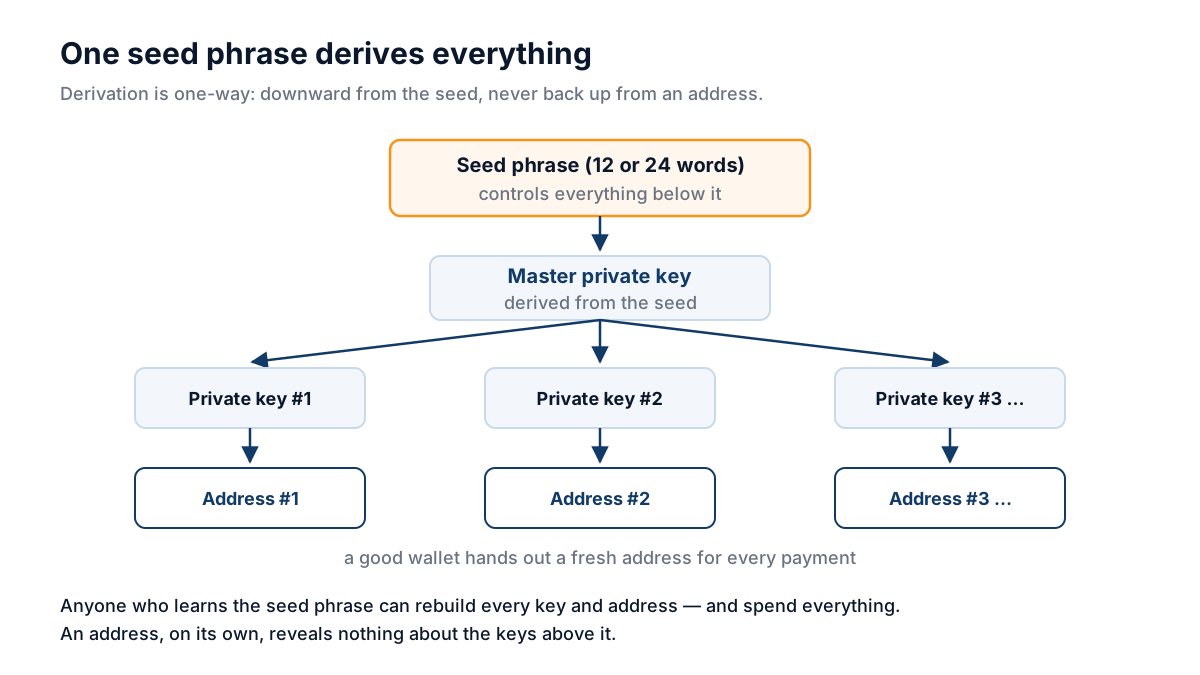
The whole wallet derives from the seed phrase: whoever knows it controls every address, while an address alone reveals nothing above it.
Academy original
XPUB: the public master key. Sharing it lets others watch your wallet but not spend from it. Useful for accounting; bad for privacy if leaked.
Backups, testing and updates
Back the recovery phrase up physically, keep it offline, and test recovery from that backup before the wallet holds anything you would miss. Keep wallet software current and verify signatures on what you install.
"Put it in my password manager" is the most common thing a newcomer does with a recovery phrase, so it is worth answering directly. A cloud-synced password manager turns an offline secret into an online one, protected by whatever protects that account. If a recovery phrase is stored digitally at all, understand that you have changed the threat model from physical access to remote compromise.
Common mistakes
Do
- Back up seed on metal (stamped or punched), kept in two physical locations
- Test recovery from backup before relying on the wallet
- Use a passphrase ('25th word') for an additional security layer
- Update wallet software regularly + verify signatures
Don't
- Take a photo of your seed phrase
- Type your seed into ANY website
- Reuse seed across multiple wallets
- Store the recovery phrase in a password manager or any cloud-synced app